---
title: "The Odoo connector, step by step"
description: "One warehouse day walked through end to end — goods in, packed onto a pallet, shipped, part of it back, the rest ground into another article, and one report taken back — with the screen and the EPCIS event it produces side by side."
canonical_url: "https://openepcis.io/docs/connectors/odoo"
last_updated: "2026-09-02T11:48:27.653Z"
---
## What this page is
The connector pages before this one explain what a connector does and why an event carries the identifiers it carries. This one does none of that explaining. It walks one warehouse day through Odoo and shows, at every step, the screen you are looking at and the EPCIS event that came out of it.
The day is a small one on purpose. Sixty kilos of coffee arrive from an importer. Forty-eight of them go into two cases, the cases go onto a pallet, and one case comes off again because the customer only ordered one. That case ships; two kilos come back a week later. The other case is emptied onto the shelf, ten kilos of beans are ground into forty bags of a different article, and the delivery turns out never to have happened at all and has to be taken back.
Nine screens and twelve events. Every event on this page is real output, copied out of the outbox of the instance in the screenshots — not an illustration written to look right.
The identifiers throughout are in the **GS1 952 test range**, which GS1 reserves for exactly this, and every host is an `example.org` placeholder. The instance in the screenshots reaches no repository, which is why the events sit in the first state of the delivery ladder rather than the last. What that ladder is, and what each rung means, is at the end of the page.
## Two switches and a prefix
Nothing is reported until a company says so, and the settings say plainly that two different services are involved. The **resolver** is where master data lives, so that a scan of a Digital Link finds something. The **repository** is where events live. They are usually different hosts, they are configured separately, and a token that may write to one can be refused by the other — capture is its own permission.
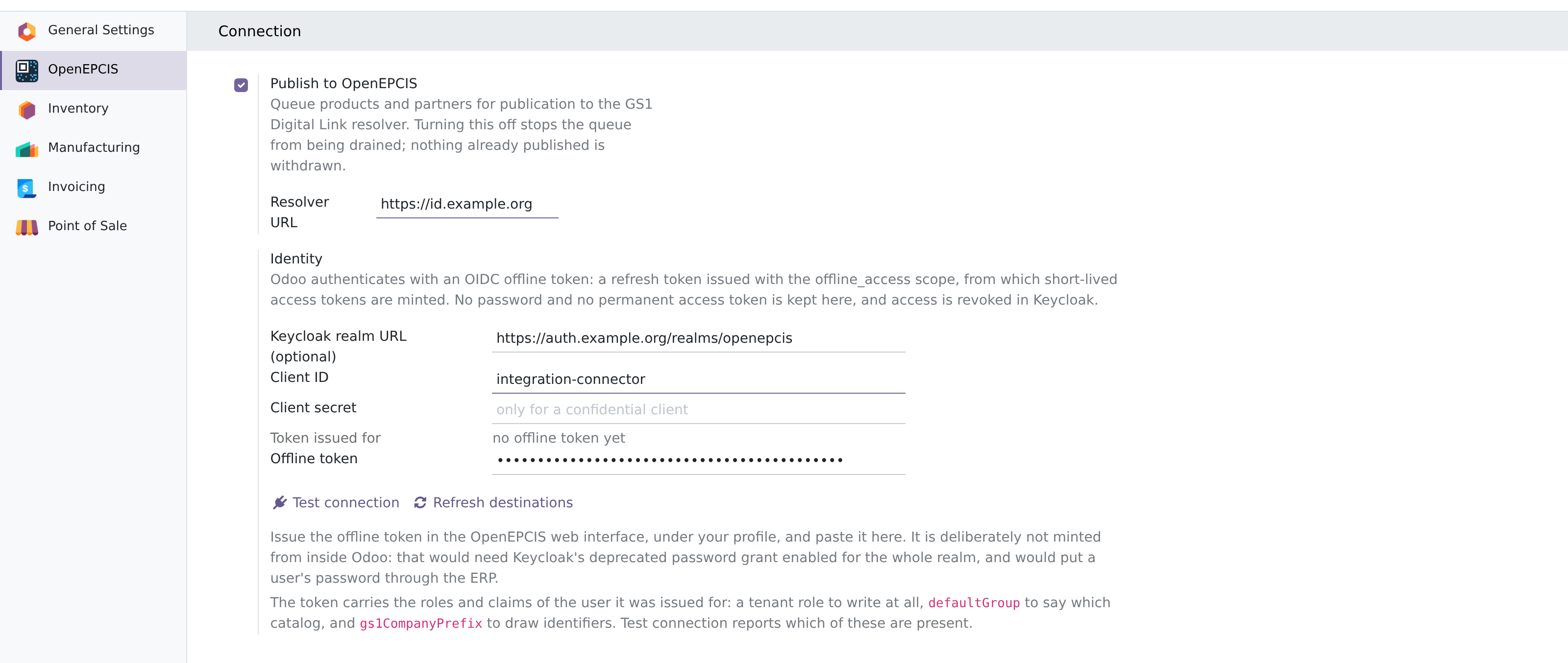
The credential is an **offline token**: a refresh token from which short-lived access tokens are minted. It is issued in the OpenEPCIS web interface and pasted in here, deliberately not minted from inside Odoo — that would need Keycloak's deprecated password grant enabled for the whole realm, and would put a user's password through the ERP.
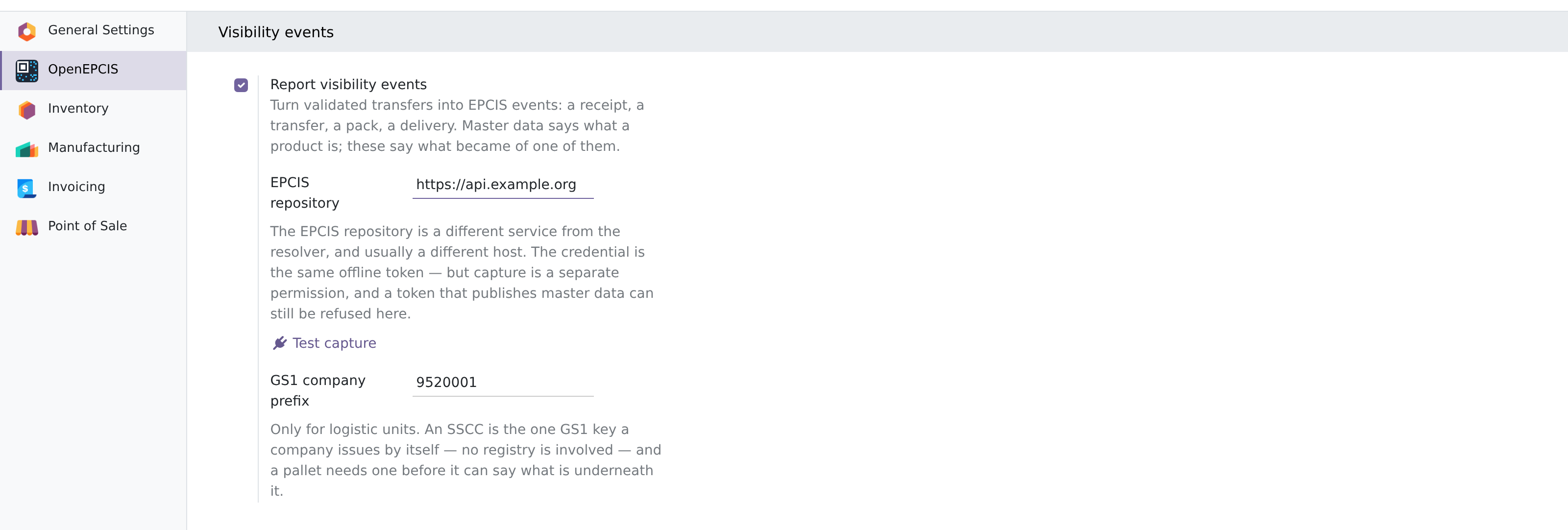
The **GS1 company prefix** deserves a note, because it is the one field here that mints identifiers rather than consuming them. A GTIN comes from a registry; an SSCC does not. A company allocates its own SSCCs from its prefix, and a pallet needs one before it can say what is underneath it. That is the whole reason the field exists, and it is used for nothing else.
## Where the *why* of an event comes from
An EPCIS event answers four questions — what, when, where and why. The first three a warehouse system already knows. The fourth it does not: Odoo knows a transfer is "incoming", but nothing in Odoo knows that GS1's Core Business Vocabulary calls that `receiving` with the goods `in_progress`.
So the mapping is not a rule buried in code. It is two fields on the operation type, pre-filled from Odoo's own codes and refined by the sequence prefix.
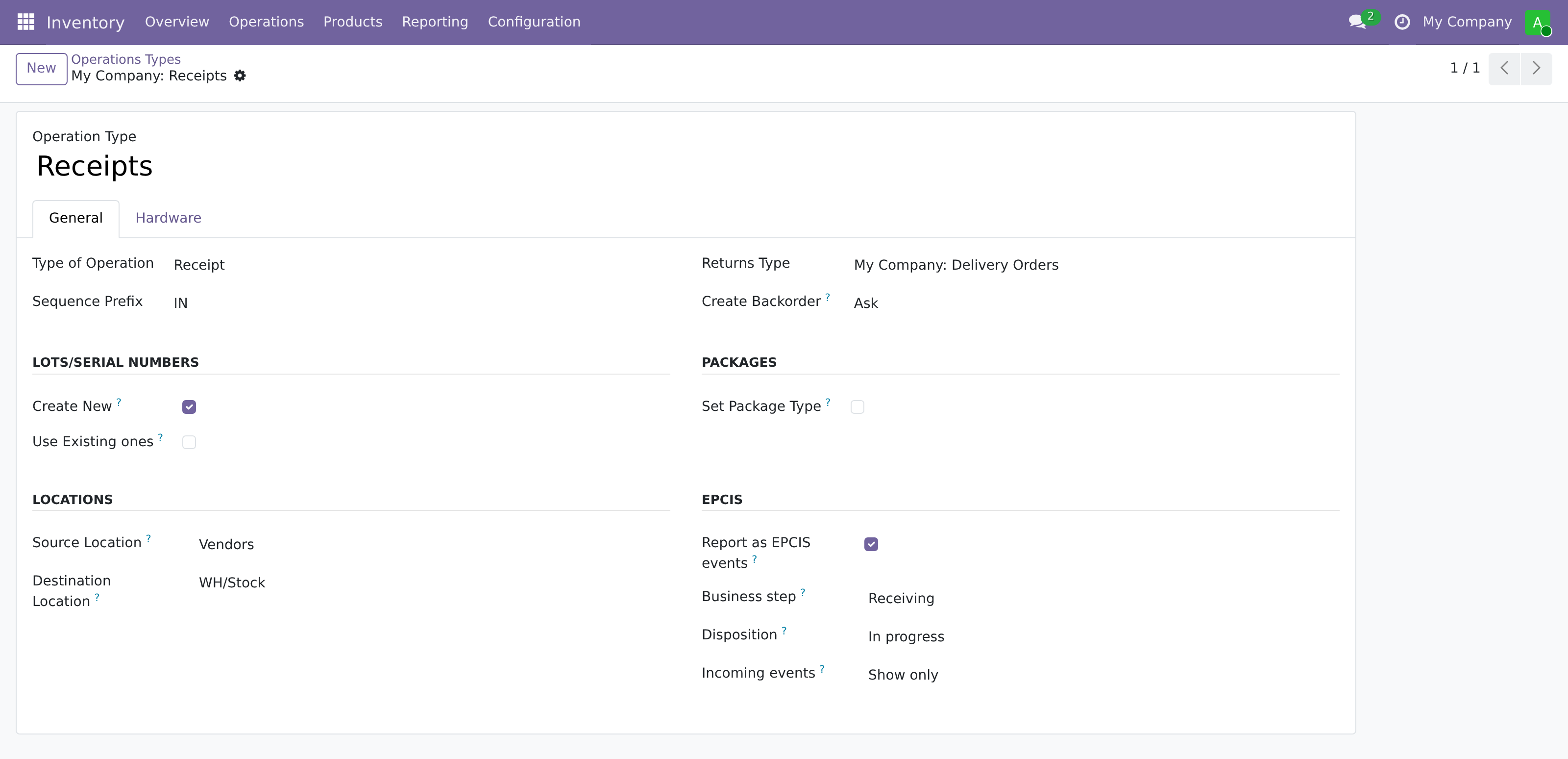
Because the pre-fill reads the sequence prefix as well as the code, a warehouse with multi-step routes ends up with its steps already distinguished:
|
Operation type
|
Odoo code
|
Business step
|
Disposition
|
|
Receipts
|
incoming
|
receiving
|
in_progress
|
|
Pick
|
internal
|
picking
|
in_progress
|
|
Pack
|
internal
|
packing
|
in_progress
|
|
Quality Control
|
internal
|
inspecting
|
in_progress
|
|
Storage
|
internal
|
storing
|
sellable_accessible
|
|
Internal Transfers
|
internal
|
storing
|
in_progress
|
|
Delivery Orders
|
outgoing
|
shipping
|
in_transit
|
|
Manufacturing
|
mrp_operation
|
commissioning
|
active
|
A choice a person has made is never overwritten by a later pre-fill. That rule is what makes the third field on that screen safe to leave alone: **Incoming events** decides what an event arriving *from* a partner may do, and it stands at *show only* until somebody deliberately changes it.
### The same screen, a different meaning
A point-of-sale terminal looks to the stock module exactly like a delivery: outgoing, `shipping`, `in_transit`. It is not a delivery, and a small bridge addon says so.

What makes this operation type a sale is not its name — it is called "PoS Orders" either way — but the fact that a till points at it. Pointing a till at an operation type changes none of the codes the pre-fill is computed from, so the bridge hooks the moment the till is *configured*, and it hands the plain shipment meaning back when the last till is pointed elsewhere. On the instance behind these screenshots the operation type read `shipping` / `in_transit` until a till was created, and `retail_selling` / `retail_sold` immediately after.
## Goods in
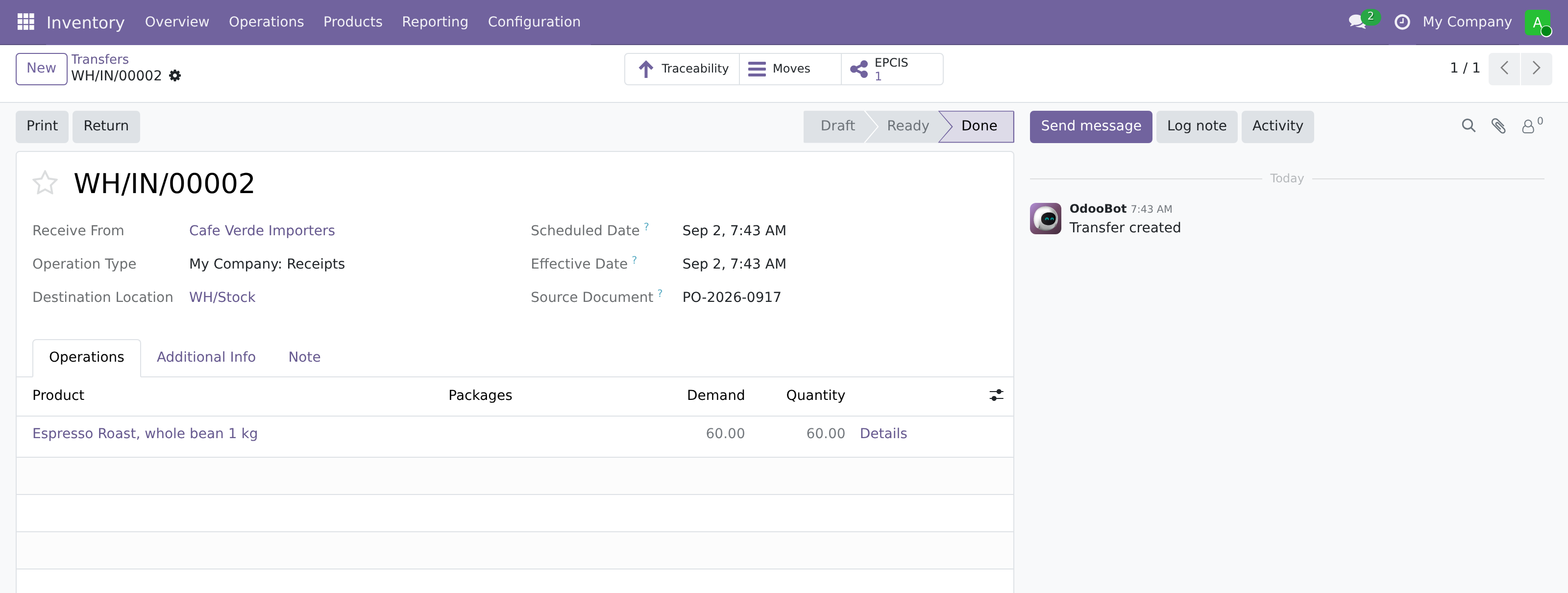
The receipt is validated in the usual way, and there is nothing EPCIS-shaped about doing it.
```json
{
"type": "ObjectEvent",
"eventTime": "2026-09-02T06:43:33.000Z",
"eventTimeZoneOffset": "+00:00",
"action": "OBSERVE",
"bizStep": "receiving",
"disposition": "in_progress",
"quantityList": [
{
"epcClass": "https://id.gs1.org/01/09520001100000/10/ROAST-2609",
"quantity": 60.0
}
],
"readPoint": { "id": "https://id.gs1.org/414/9520001000010" },
"bizLocation": { "id": "https://id.gs1.org/414/9520001000010" },
"bizTransactionList": [
{
"type": "po",
"bizTransaction": "urn:epcglobal:cbv:bt:9520001000010:PO-2026-0917"
}
],
"sourceList": [
{
"type": "owning_party",
"source": "https://id.gs1.org/414/9520001000027"
}
]
}
```
Four things in that document are decisions rather than transcription.
The coffee is **lot tracked**, so it appears in the `quantityList` as an `epcClass` and not in the `epcList`. A lot is a set of things, not a thing: `/01/{gtin}/10/{lot}` is an LGTIN, and putting an LGTIN in an `epcList` is the most common way to produce an event that validates and means something else. Serial-tracked goods are the other case, and only those land in the `epcList`.
The **quantity carries no unit**, and that is deliberate. EPCIS reads a quantity with no `uom` as a piece count, so stating the code for pieces would be redundant — and one fact spelled two ways is worse than redundant, because the quantity element goes into the event hash.
The **read point is a GLN**, written as an SGLN Digital Link under AI 414, taken from the location. A raw GLN is accepted by the repository and then found by no query. Where no location on the path carries a GLN, no event is made at all and the reason is posted on the transfer — half an answer is not worth sending.
And the **Origin field became the business transaction**. Whatever purchase order reference a warehouse types there is what downstream readers will match on, which is why it is carried rather than invented.
### An event is not master data
The event above names the lot as `/01/09520001100000/10/ROAST-2609`, and it does so whether or not anything is published about that lot anywhere. Reporting events and publishing master data are two different decisions, taken in two different places, and the lot form is where the second one lives.
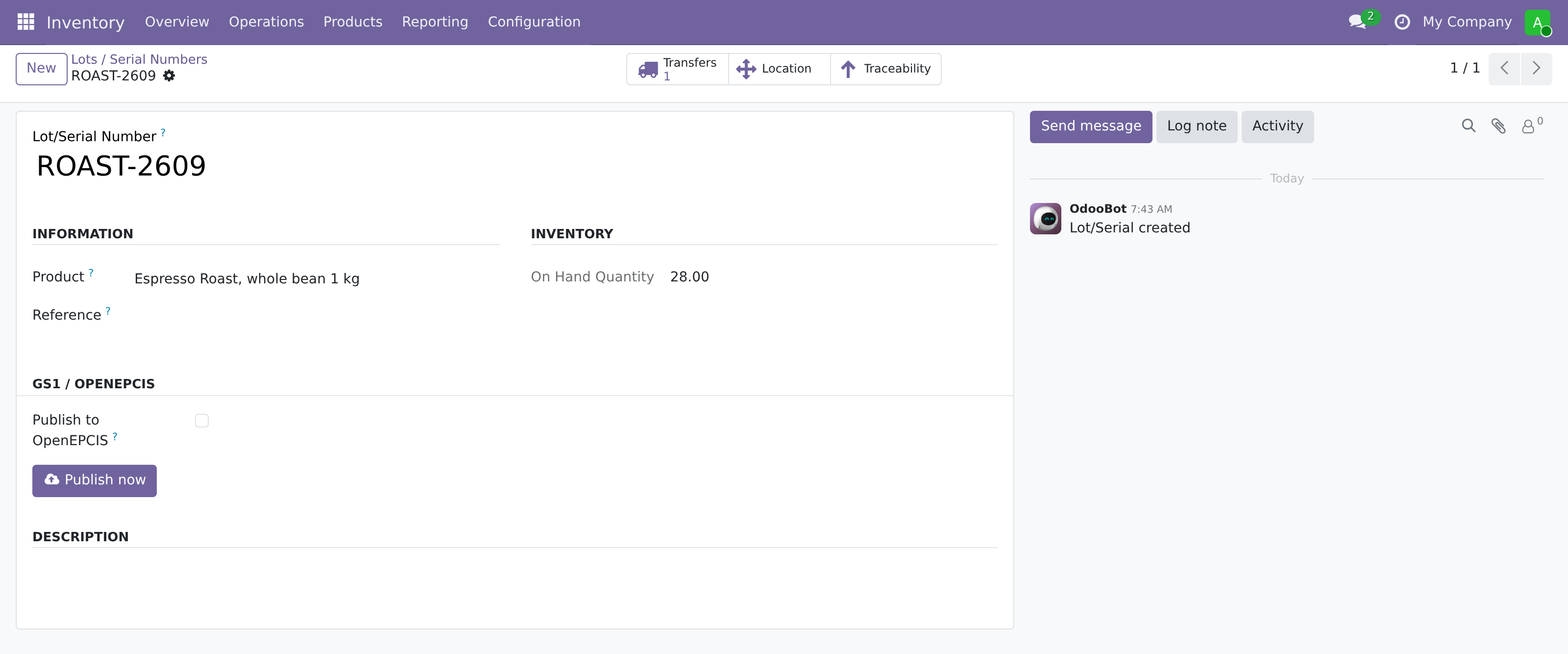
The distinction matters at scan time rather than at capture time. The identifier in the event is well-formed and the repository will store and find it either way; but a phone pointed at `/01/09520001100000/10/ROAST-2609` reaches something only if an instance document has been published under the model's GTIN. And instances hang off the model: a lot whose product is not in the catalog yet is not an error — it waits, says so on its own form, and follows the moment the product lands.
## Onto a pallet
Two cases and a pallet come into being, and each is given an SSCC at that moment rather than when it is first reported. A unit is identified from the moment it exists; a number handed out later would leave the earlier events unable to name it.
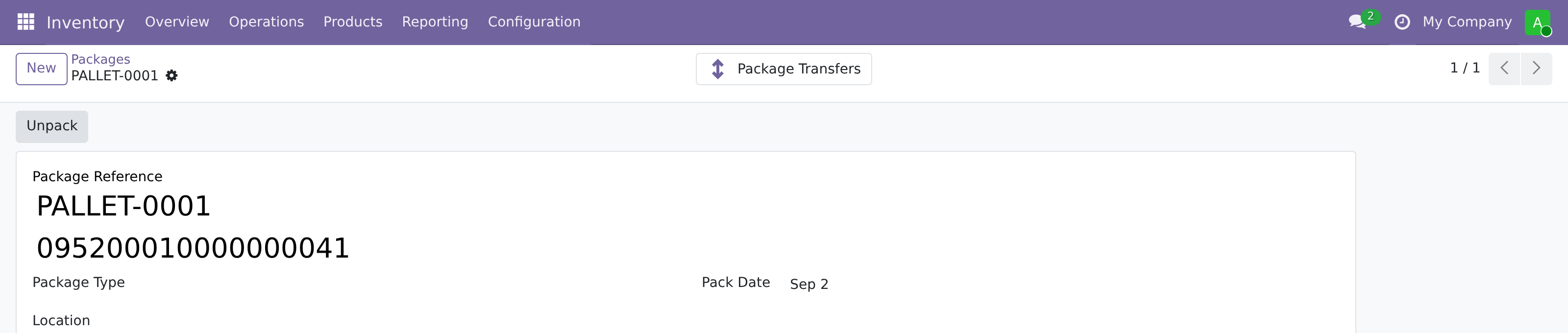
Putting the coffee into a case is an aggregation. Its `parentID` is the case's SSCC, and its children are the goods:
```json
{
"type": "AggregationEvent",
"parentID": "https://id.gs1.org/00/095200010000000058",
"action": "ADD",
"bizStep": "packing",
"disposition": "in_progress",
"childQuantityList": [
{
"epcClass": "https://id.gs1.org/01/09520001100000/10/ROAST-2609",
"quantity": 24.0
}
],
"readPoint": { "id": "https://id.gs1.org/414/9520001000010" },
"bizLocation": { "id": "https://id.gs1.org/414/9520001000010" }
}
```
Then the cases go onto the pallet — and this is the event that has no equivalent on Odoo 18, because that release has no nesting to report. The children are **SSCCs** rather than trade items:
```json
{
"type": "AggregationEvent",
"parentID": "https://id.gs1.org/00/095200010000000041",
"action": "ADD",
"bizStep": "packing",
"disposition": "in_progress",
"childEPCs": [
"https://id.gs1.org/00/095200010000000058",
"https://id.gs1.org/00/095200010000000065"
],
"readPoint": { "id": "https://id.gs1.org/414/9520001000010" },
"bizLocation": { "id": "https://id.gs1.org/414/9520001000010" }
}
```
A pallet of cases is the oldest hierarchy GS1 describes, and the vocabulary never needed extending for it. What was missing was the fact, and only the newer Odoo records it.
Both of these are **standing statements**, which is the distinction that decides how the rest of the day is reported. A movement is a fact about a moment and can simply be stated. An aggregation answers a question: scan the outer label, and the repository says what is under it. A standing statement that is never withdrawn keeps answering after it has stopped being true — so it has to be reported at both ends.
## One case comes off, and ships
The customer ordered one case, so it leaves the pallet. That is the other end of the statement above:
```json
{
"type": "AggregationEvent",
"parentID": "https://id.gs1.org/00/095200010000000041",
"action": "DELETE",
"bizStep": "unpacking",
"disposition": "in_progress",
"childEPCs": ["https://id.gs1.org/00/095200010000000058"],
"readPoint": { "id": "https://id.gs1.org/414/9520001000010" },
"bizLocation": { "id": "https://id.gs1.org/414/9520001000010" }
}
```
The case is then added to a delivery as a whole unit, and the delivery is validated. Note what does *not* happen: no second packing event. A unit that merely travels was neither packed nor unpacked, and restating an aggregation that never changed would be a claim about a moment that had none.
```json
{
"type": "ObjectEvent",
"action": "OBSERVE",
"bizStep": "shipping",
"disposition": "in_transit",
"quantityList": [
{
"epcClass": "https://id.gs1.org/01/09520001100000/10/ROAST-2609",
"quantity": 24.0
}
],
"readPoint": { "id": "https://id.gs1.org/414/9520001000010" },
"bizLocation": { "id": "https://id.gs1.org/414/9520001000010" },
"bizTransactionList": [
{
"type": "desadv",
"bizTransaction": "urn:epcglobal:cbv:bt:9520001000010:WH%2FOUT%2F00001"
}
],
"destinationList": [
{
"type": "owning_party",
"destination": "https://id.gs1.org/414/9520001000034"
}
]
}
```
The transfer had no purchase order reference of its own, so the despatch advice is named after the transfer, and the customer's GLN travels as the destination party.
## Two kilos come back
A return is where a `TransactionEvent` finally earns its place, and it is the only place this connector emits one.
Every event above already names the paperwork it belongs to, so associating goods with an order needs no event of its own — stating it again as a `TransactionEvent` with `action=ADD` would assert the same fact twice. **Ending** the association is the thing no other event says. Goods coming back stop belonging to the shipment they went out on, and a receipt does not say that: it says they arrived somewhere.
```json
{
"type": "TransactionEvent",
"action": "DELETE",
"bizStep": "receiving",
"disposition": "returned",
"quantityList": [
{
"epcClass": "https://id.gs1.org/01/09520001100000/10/ROAST-2609",
"quantity": 2.0
}
],
"readPoint": { "id": "https://id.gs1.org/414/9520001000010" },
"bizLocation": { "id": "https://id.gs1.org/414/9520001000010" },
"bizTransactionList": [
{
"type": "desadv",
"bizTransaction": "urn:epcglobal:cbv:bt:9520001000010:WH%2FOUT%2F00001"
}
]
}
```
The transaction it releases is the one the *original* transfer named — which is why a return of goods that named no paperwork releases nothing, and reports nothing.
## The other case is emptied
A warehouse takes a case apart in two quite different ways, and only one of them goes through a transfer. Picking goods off it in a delivery leaves move lines. Pressing **Unpack** on the package leaves none at all: it clears the package on the quants and is done.
Reporting only the first would tell the repository about the rarer of the two and stay silent about the everyday one, and an aggregation nobody withdraws keeps answering with goods that have been on the shelf for weeks. So the button says it too:
```json
{
"type": "AggregationEvent",
"parentID": "https://id.gs1.org/00/095200010000000065",
"action": "DELETE",
"bizStep": "unpacking",
"disposition": "in_progress",
"childQuantityList": [
{
"epcClass": "https://id.gs1.org/01/09520001100000/10/ROAST-2609",
"quantity": 24.0
}
],
"readPoint": { "id": "https://id.gs1.org/414/9520001000010" },
"bizLocation": { "id": "https://id.gs1.org/414/9520001000010" }
}
```
Everything that event needs is read *before* the button runs, and that is more than it looks: afterwards the quants no longer name the unit, so the contents are gone — and so is the unit's location, which Odoo computes from those same quants.
## Beans become ground coffee
Grinding is the one movement where the identifiers going in are not the identifiers coming out, and that is exactly what a `TransformationEvent` is for. It hangs on the manufacturing order rather than on a transfer, and it lives in a bridge addon of its own so that a database without Manufacturing never loads it.
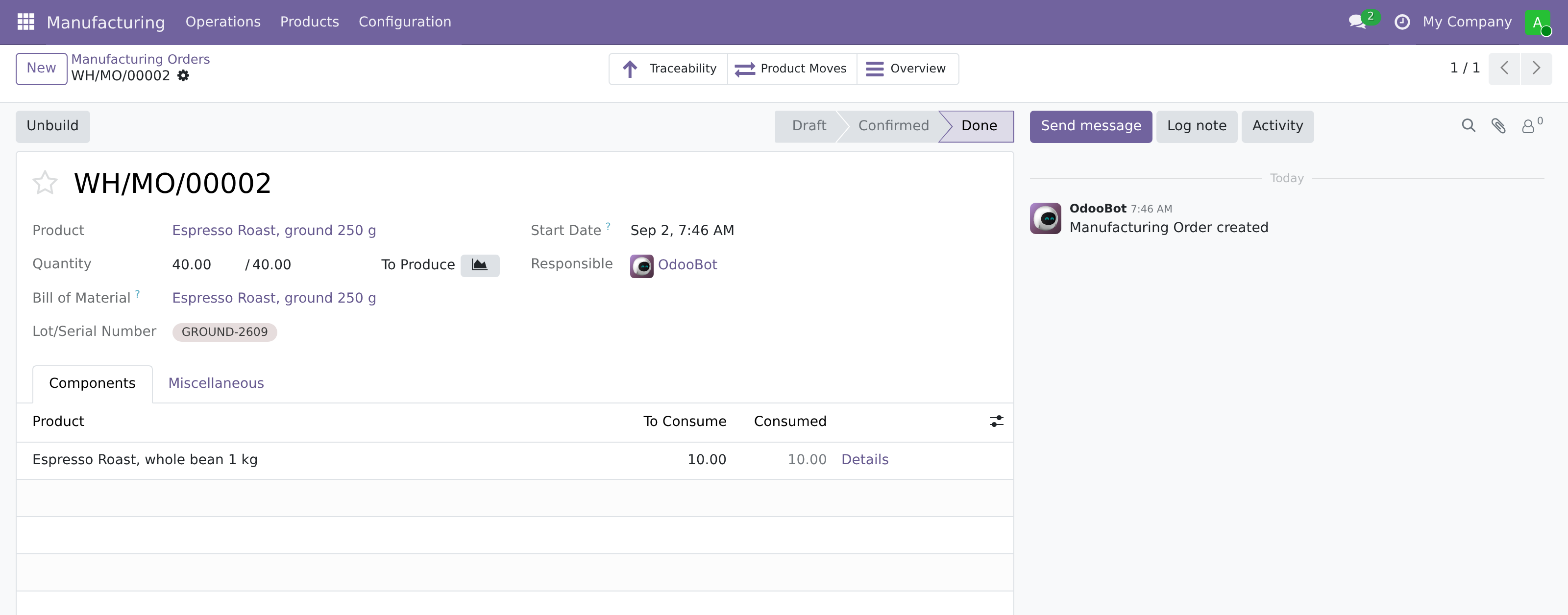
```json
{
"type": "TransformationEvent",
"inputQuantityList": [
{
"epcClass": "https://id.gs1.org/01/09520001100000/10/ROAST-2609",
"quantity": 10.0
}
],
"outputQuantityList": [
{
"epcClass": "https://id.gs1.org/01/09520001100017/10/GROUND-2609",
"quantity": 40.0
}
],
"bizStep": "commissioning",
"disposition": "active",
"readPoint": { "id": "https://id.gs1.org/414/9520001000010" },
"bizLocation": { "id": "https://id.gs1.org/414/9520001000010" }
}
```
It carries **no action** — it is the one event type that has none, because there is nothing to add to or remove from. And a half transformation is refused rather than sent: an event with inputs and no outputs asserts that goods vanished.
## Taking a report back
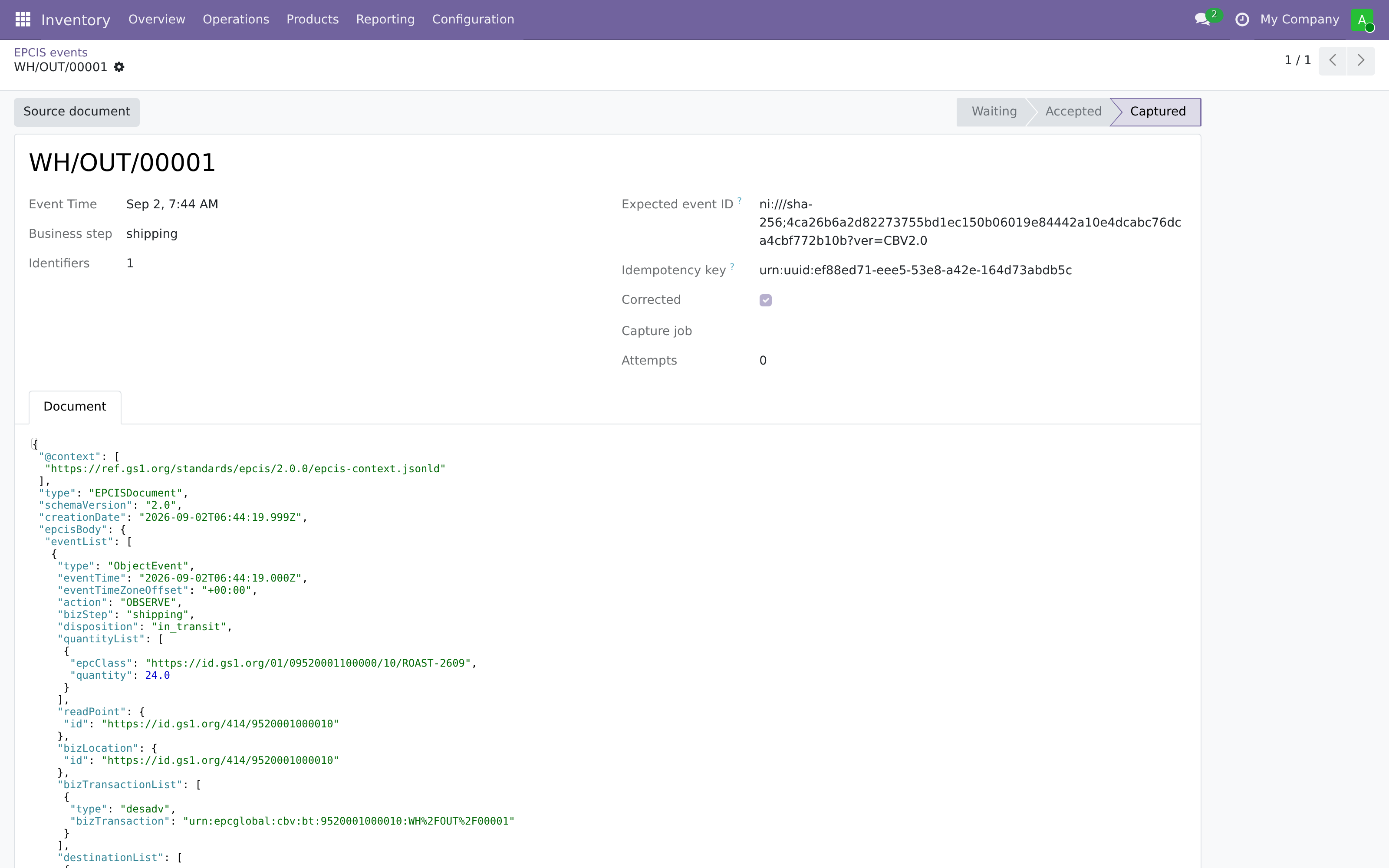
The delivery turns out never to have happened. An event cannot be pulled out of a repository — somebody may already have read it — and it should not be. EPCIS answers this with an error declaration, and the shape of that answer is the reason the whole identity scheme holds together.
```json
{
"type": "ObjectEvent",
"action": "OBSERVE",
"bizStep": "shipping",
"disposition": "in_transit",
"quantityList": [
{
"epcClass": "https://id.gs1.org/01/09520001100000/10/ROAST-2609",
"quantity": 24.0
}
],
"readPoint": { "id": "https://id.gs1.org/414/9520001000010" },
"bizLocation": { "id": "https://id.gs1.org/414/9520001000010" },
"bizTransactionList": [
{
"type": "desadv",
"bizTransaction": "urn:epcglobal:cbv:bt:9520001000010:WH%2FOUT%2F00001"
}
],
"destinationList": [
{
"type": "owning_party",
"destination": "https://id.gs1.org/414/9520001000034"
}
],
"errorDeclaration": {
"declarationTime": "2026-09-02T06:46:20.614Z",
"reason": "did_not_occur"
}
}
```
The withdrawal is the original event again, with a declaration attached. The declaration fields are excluded from the canonical event hash, so the correction carries **the same identity** as the event it corrects: the repository recognises which event is meant without Odoo ever having learned what it was called.
Only `did_not_occur` is offered. The other CBV reason, `incorrect_data`, keeps the occurrence and disputes the description — which means naming the corrected events as well, and this connector mints none.
## The outbox, and the two identifiers
Reporting must never be the reason a transfer fails. A warehouse operator pressing *Validate* can do nothing about an unreachable repository and should not be told about it, so nothing is sent at that moment: the transfer writes rows into an outbox, and a scheduled job delivers them.
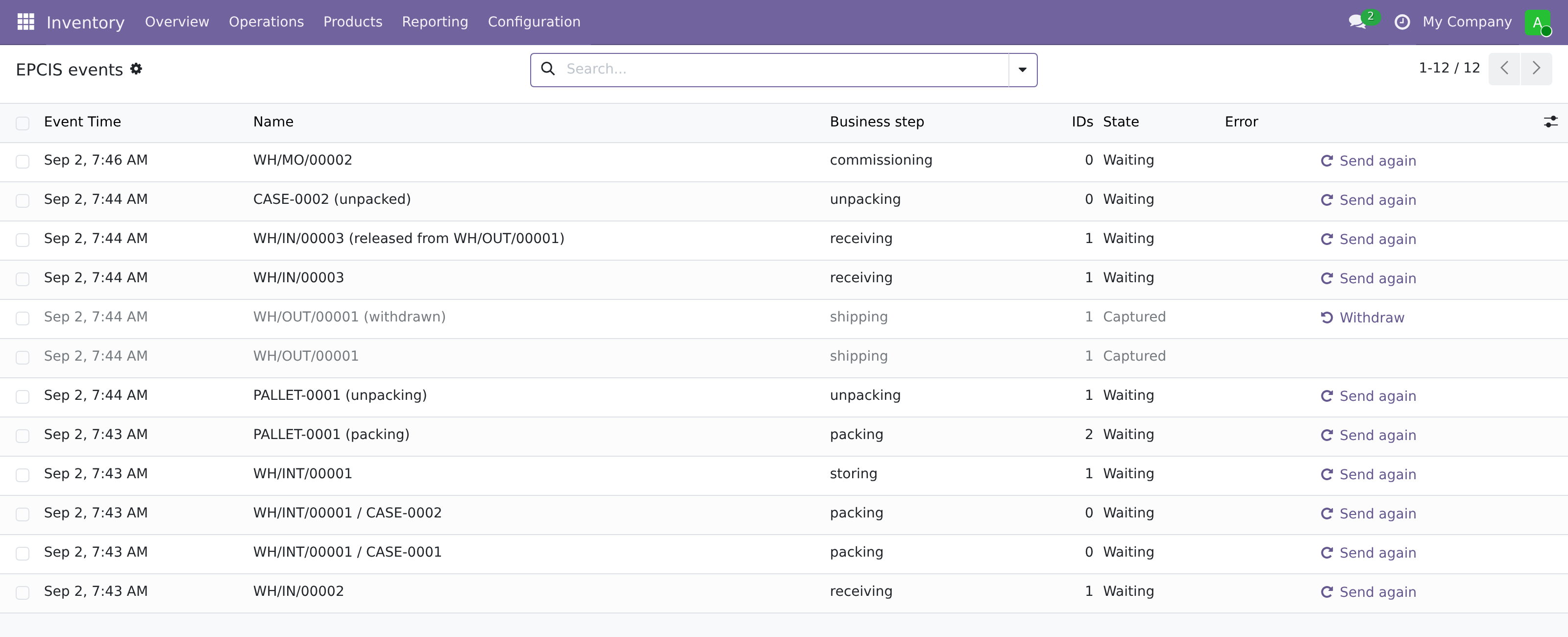
Delivery is **two answers, not one**, and the outbox keeps them apart. *Accepted* means the repository has taken the document into custody. *Captured* means it is stored. A queue that deletes its row on the 202 reports success for events that were rejected minutes later; a capture job the repository does not recognise is explicitly not counted as success, because a rejected document and a forgotten one answer alike. After five attempts a row stops asking and says it cannot be confirmed.
Open a row and both identifiers are visible, which is worth a moment because they do different jobs.
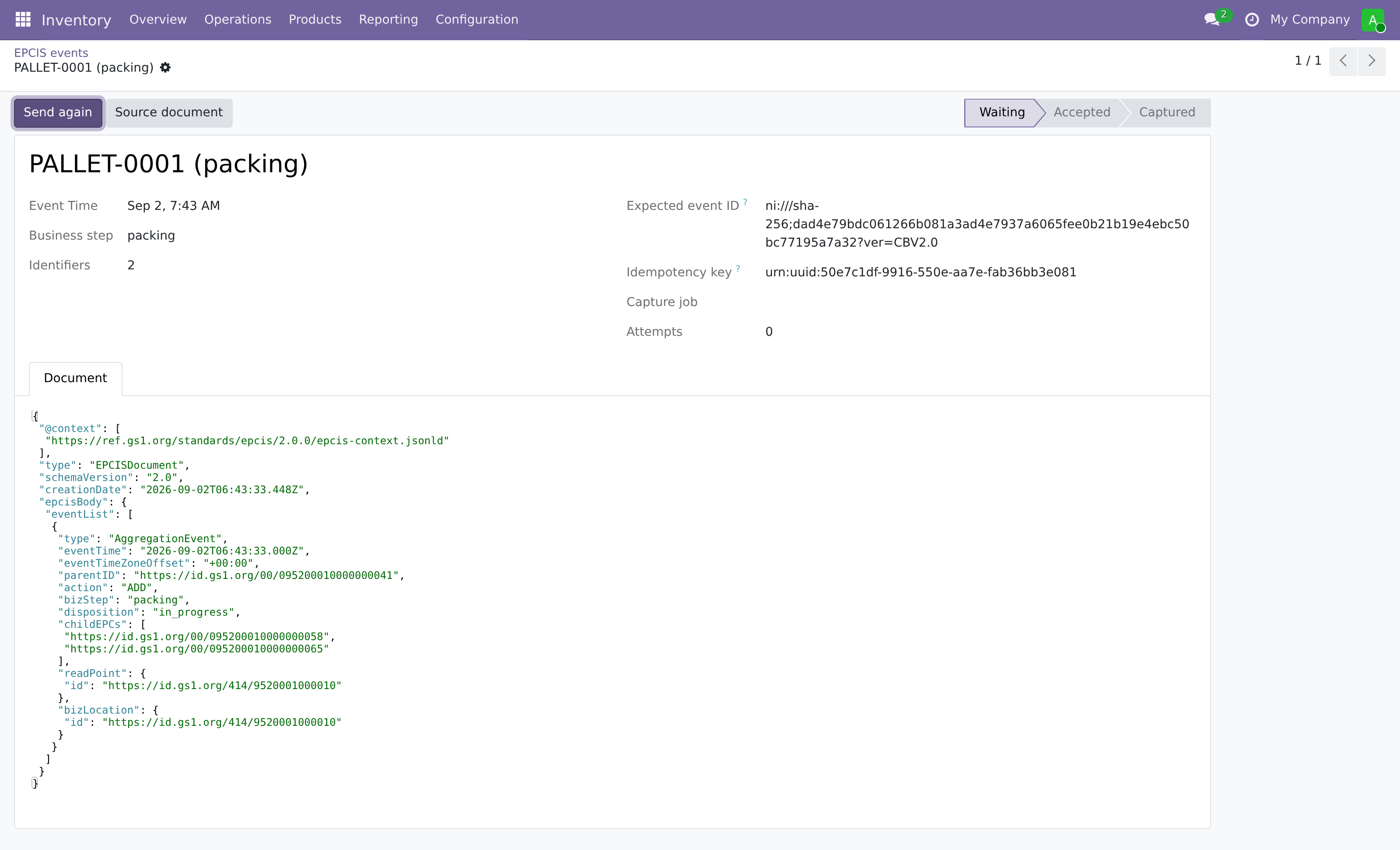
The **expected event ID** is the canonical CBV event hash, `ni:///sha-256;?ver=CBV2.0`, computed over everything the event asserts. It is not a name anyone chose: anyone holding the event can recompute it, which is what makes it an identity rather than an allocation. Two companies describing the same observation arrive at the same identifier without having agreed on anything beforehand. Odoo computes it here so that it can recognise its own events coming back, and sends the document without it — the repository computes the same hash when it stores the event, and there is exactly one canonicalisation, on the side that keeps the event.
The **idempotency key** is private bookkeeping. It is derived from the database, the transfer and the identifiers, with a unique index per company, so the same movement cannot enter the outbox twice. It is not the event's name and it never leaves Odoo.
## Reproducing this
The instance in these screenshots is a throwaway: Odoo 19 with the six connector addons, seeded with exactly the day described above and pointed at hosts that do not exist. The images are not taken by hand — `apps/openepcis-home/scripts/odoo-screenshots.mjs` drives a headless browser through the same screens in one run, so they can be renewed when the addon changes instead of quietly going stale.
The addons live in [openepcis-odoo](https://github.com/openepcis/openepcis-odoo) under LGPL-3, on two branches: `19.0` for the version shown here, and `18.0` for the current Odoo long-term release. The two carry the same six addons and differ only where Odoo itself does; the one event on this page that has no counterpart on 18.0 is the pallet of cases, because Odoo 18 has no nested units to report.
### About the screenshots
Odoo 19 with no demo data, so that nothing on screen distracts from the day being walked through. Every identifier is in the GS1 952 test range, check digits included. Hosts are `example.org` placeholders and the offline token is a literal placeholder, so this instance publishes to nobody and never did. The delivery states were seeded locally: the two rows that read *Captured* were never captured by any repository, because the error declaration can only be raised against a captured event and the withdrawal is worth showing.